

What it does
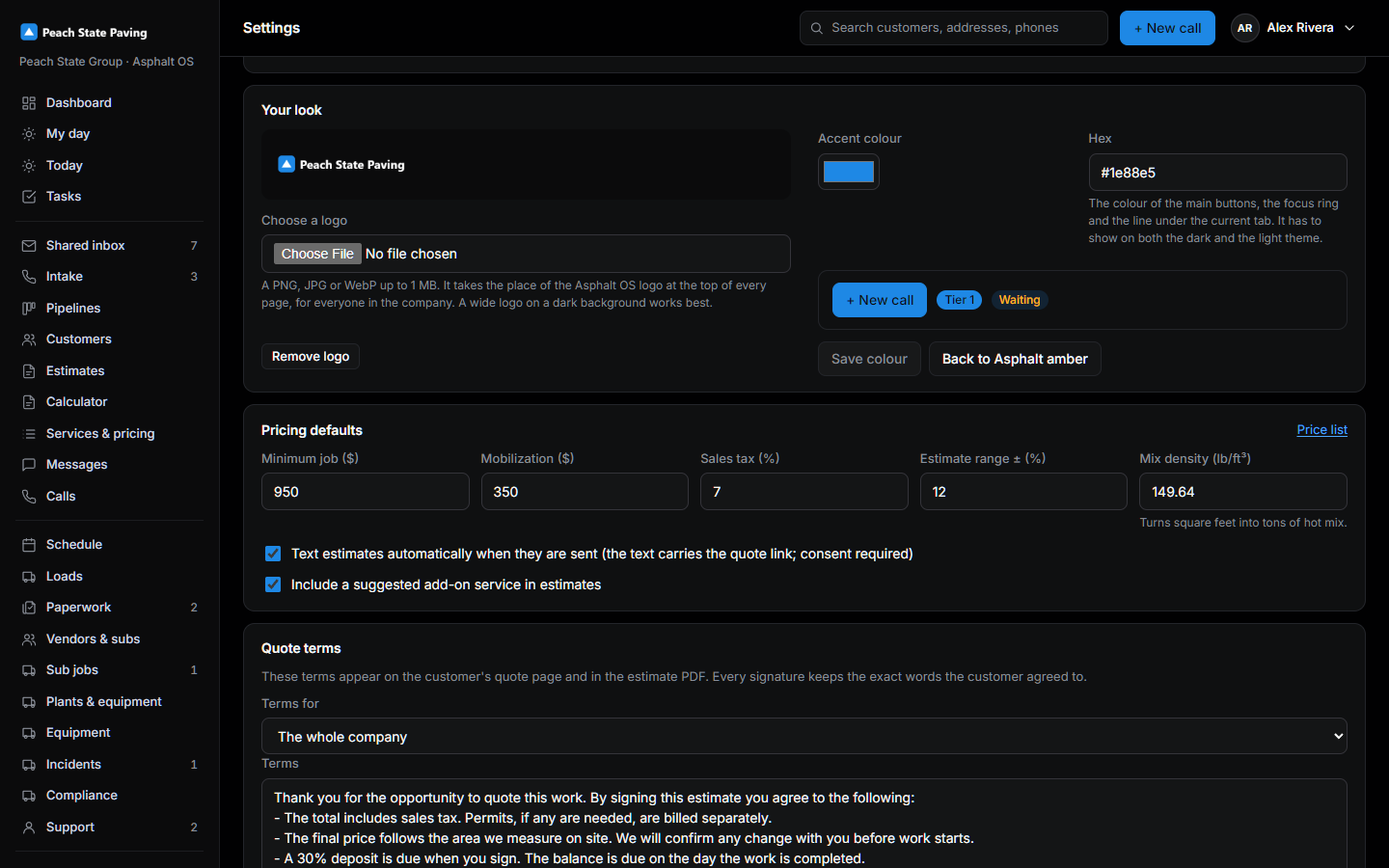
Out of the box the app shows the Asphalt OS logo at the top of every page and draws its main buttons in Asphalt amber. A company may bring its own: the logo it prints on its trucks, and the colour of its brand. Both are set once, on Settings, on the card Your look, and everyone in the company sees them the moment they are saved, on their phone and on the office PC alike. The sign-in page, the two-factor page and the welcome pages keep the Asphalt OS logo: nobody is signed in yet, so the app does not know whose colours to show.
Who can change it
The same people who may change company settings ("Change company and sign-in settings": in a new company the Controller, the CEO and the Asphalt OS staff role, so support can set it up for you). Anyone else who can open Settings sees the page read-only and no Your look card. The database refuses a change from anyone else regardless of what the page shows, and every change, whoever made it, is a line in the history log.
The logo
- A PNG, JPG or WebP file of up to 1 MB. Anything else is refused in a sentence, and the file's own bytes decide what it is, not its name.
- It is shown 26 pixels tall (22 on a phone) in the near-black sidebar, so a wide logo made for a dark background works best. A square or a tall one is fitted into the same box.
- Under it the small line reads "Your company · Asphalt OS" instead of the motto.
- A new upload replaces the old one, and Remove logo puts the Asphalt OS logo back. The old file is deleted for good, record and bytes, the moment it is no longer the logo.
- The logo is stored encrypted like every other upload, in the company's own
brandfolder. Every member of the company may see it (the sidebar of every page does); nobody at another company can, and nobody outside the company at all: the customer's quote, billing-form and payment pages are unchanged and show the brand's name and colour as before.
The colour
- Pick it with the colour picker or type it as a hex code, "#" and six letters or digits ("#1e88e5"). The preview on the card shows the main button and two status pills in the colour before you save.
- A colour that is nearly black or nearly white is refused: it has to show on both the dark and the light theme, and the app decides by itself whether the text on the buttons is near-black or white so that it stays readable.
- It changes the main buttons, the focus ring and the line under the current tab. Status colours stay as they are, the amber of "waiting" pills included, so a warning still looks like a warning. On the dark theme the line and the focus ring are lightened, and on the light theme darkened, until they read on the page: a navy stays navy on the buttons and shows as a lighter blue where a thin line has to be seen.
- Back to Asphalt amber puts the original colour back.
Only a colour in that exact shape is ever kept or shown: whatever is typed is checked on the page, again by the server, and once more by the database, and it reaches the screen only through the browser's own colour setting, never as text in a style sheet. A colour cannot carry anything else along.
Not changed by this
- The customer's pages (quote, billing form, pay) and every PDF and email: they carry the brand's name and colour as before, never the logo.
- The phone app's icon and splash screen, and the browser's tab colour. The phone apps from the stores keep the Asphalt OS logo for now (they take the colour).
- The Asphalt OS website and this wiki.