

What it does
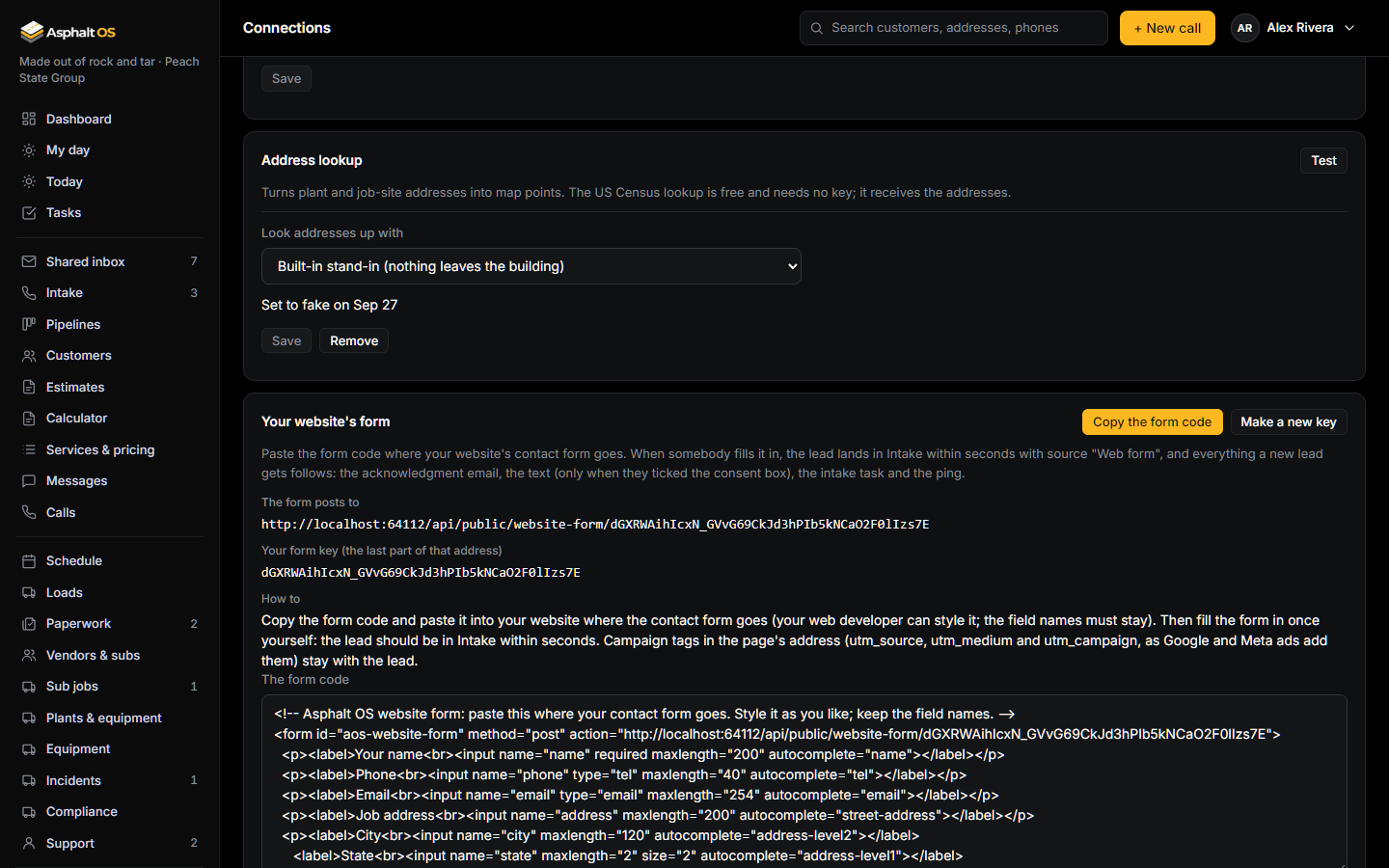
Until now a lead came in by itself only from a phone call, from the shared inbox and from PlanHub. Now your own website feeds the queue too. Each company gets a form key and a ready-made piece of HTML, both at the bottom of Connections on the card Your website's form. Your web developer pastes the code where the contact form goes. When a visitor fills it in, the lead is in Intake within seconds with source Web form, and everything a new lead gets follows: the acknowledgment email, the text (only when the visitor ticked the consent box), the task for the intake person and the ping to the team. The visitor sees a thank-you line without leaving your page.
Set it up (for your web developer)
- Open Connections (the CEO and the Asphalt OS staff can) and scroll to Your website's form. The first time the card is opened, Asphalt OS makes the company's key.
- Press Copy the form code and paste it into the website where the contact form goes. It is plain HTML and one small script: nothing to install, no account to open. Style it as you like, but keep the field names; the page can use any of the fields and leave the others out.
- Fill the form in once yourself. The lead should be in Intake within seconds, and the acknowledgment email in your test mailbox (or in your inbox, once sending is Live). If the page answers "This form isn't connected to a company", the address in the code is not the one on the card.
The form posts to the address on the card: your app's address, then /api/public/website-form/ and the key. The key is the only thing that ties a submission to your company, so a form on somebody else's website with your key would feed your queue; if that ever happens, make a new key (below).
The fields
| Field | Rule |
|---|---|
| name | Required, up to 200 characters. |
| phone | Optional, up to 40 characters, 7 to 15 digits. Either a phone or an email is needed. |
| Optional, up to 254 characters, in the shape name@company.com. | |
| address, city, state, zip | Optional. The state is two letters. A street and a city make the lead's address (a blank state is your company's own); anything less goes into the lead's notes so nothing typed is lost. |
| service | Optional, up to 120 characters, in the visitor's own words ("Asked about: ..." in the notes). |
| message | Optional, up to 2,000 characters ("Web form: ..." in the notes). |
| sms_consent | The consent box. Counts only when ticked. |
| utm_source, utm_medium, utm_campaign, page | Filled by the script from the page's address: the campaign tags and the page the form was on. |
| website | The hidden field nobody sees. Anything in it means a bot, and the request is ignored. |
A field the form sends that Asphalt OS did not ask for is dropped, not refused: website form tools add fields of their own, and none of them should cost you a lead. A refusal (no name, no way to reach the person) is answered in plain words, and the script shows them under the form.
The consent box, and why
The box says exactly "You may text me about my request; reply STOP to opt out". Those are the words the texting registration wants a customer to have agreed to, so keep them. Only a ticked box records texting consent (method "web form") for the number given; an unticked box, or no box, means the lead gets the acknowledgment email and no text. A visitor who ticks the box and gives no usable phone number gets no text either: consent is kept for a number, never for a name.
What happens after a submission
- The app server checks the fields and stores the submission in a queue only the background worker reads. It never creates the lead itself.
- Within seconds the worker files it as a lead, as the company's Automation member, through the same steps a phone call goes through. If the phone or email is already on a customer in your customer book, the lead lands on that customer's own profile, with the visitor as a contact, instead of making a second customer.
- The lead is acknowledged and routed like every other new lead: see What happens on its own. Each of those steps still honours its switch on Automations.
A submission that cannot be a lead (no name; a phone that is not a number and no email) is dropped, and the worker's log says why in its own words, never what the visitor typed. Nobody's message is ever written to a log line.
Spam protection
- The hidden
websitefield: people never see it, bots fill it. A filled one is answered exactly as a real submission is, and nothing is kept. - One address may send 10 submissions a minute; your company takes at most 60 a minute from everywhere. The 61st is told to try again in a minute. Bots that get past both make leads you can mark lost; nothing they send is ever emailed or texted anywhere but to the address or number they gave, and only the acknowledgment.
- A submission is at most 64 KB, a message at most 2,000 characters, and hidden control characters are taken out.
Campaign tags
When an ad sends a visitor to your page, Google and Meta add tags to the page's address: utm_source (where the ad ran), utm_medium (the kind of ad) and utm_campaign (the campaign's name). The form code reads them from the address bar, along with the page's own address, and the lead keeps all four for good: the lead drawer shows "Campaign: spring-sealcoat (google / cpc) · from peachstatepaving.example". They are set when the lead is created and never change after, so what a campaign brought in stays true. They are the first piece of marketing attribution; when spend can be typed per campaign, the Marketing page will show what each campaign's leads cost. Today spend is per channel, so there is no cost per lead per campaign yet.
Making a new key
The key sits in your public web page, so it is not a secret: what makes it safe is that it cannot be guessed (43 random characters) and that it can be replaced. The owner presses Make a new key on the card, confirms, and types their password again. The old key stops working that moment: a form still carrying it is answered "This form isn't connected to a company" until the new form code is pasted in. Make a new key when the code was pasted somewhere it should not be, or when a web developer who had it should not have it any more. Making and replacing the key are lines in the history log, read by the people who may change connections.