

The Marketing page
Marketing answers one question: how much did each lead, each accepted quote and each job cost us, per channel? A channel is where a lead came in by, exactly as the app records it on the lead: Google, Facebook, PlanHub, the website form, a phone call, a missed call, an email, a referral or a repeat customer. Pick a range at the top: this month, the last 3 months or the last 12 months.
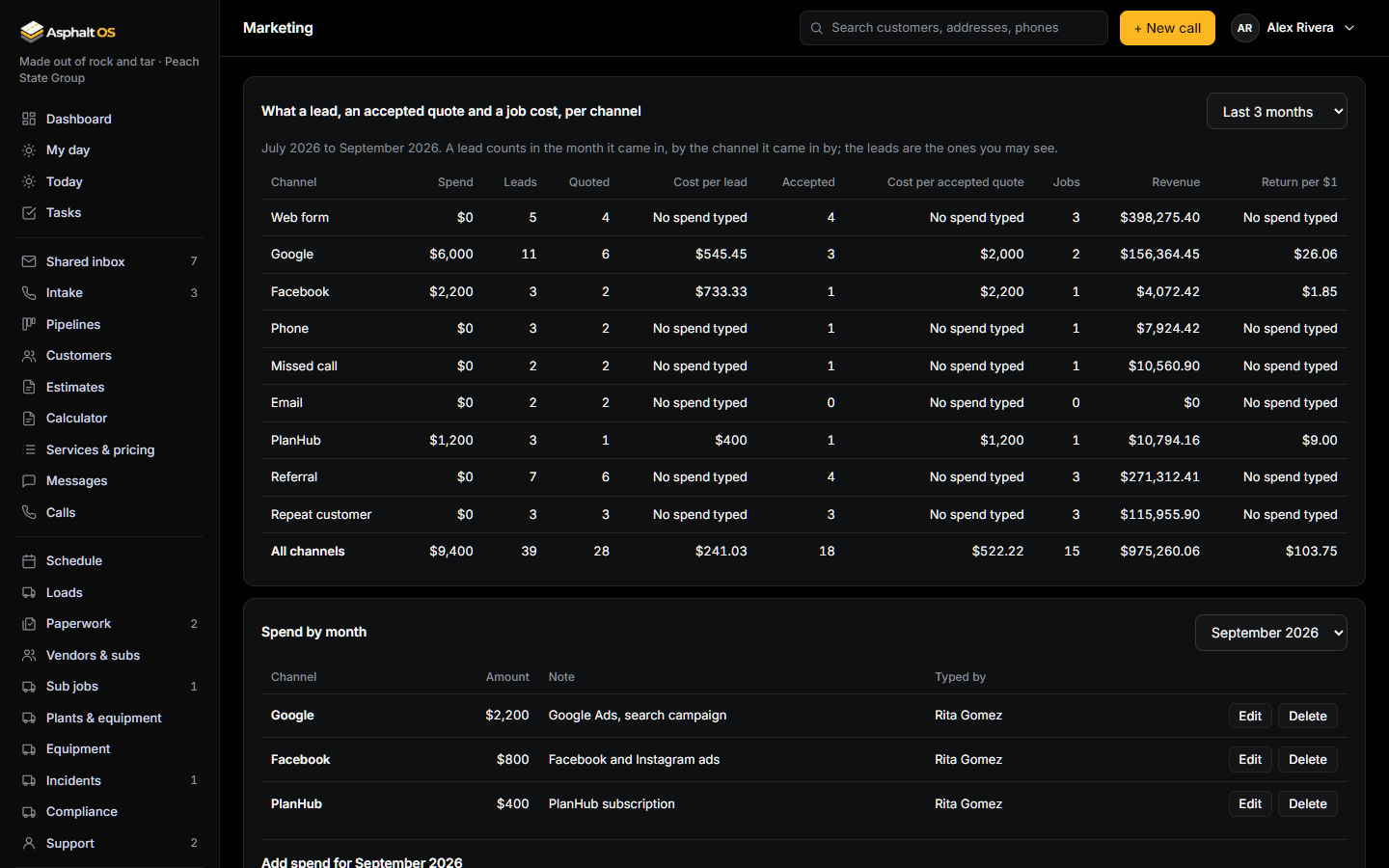
One row per channel, and an All channels row at the bottom:
| Column | What it is |
|---|---|
| Spend | What the office typed for this channel in these months (see below). |
| Leads | The leads that came in by this channel in these months. |
| Quoted | Of those leads, how many have an estimate the customer has: sent, viewed or approved. |
| Cost per lead | Spend divided by leads. |
| Accepted | Of those leads, how many the customer accepted (the status Accepted, whether the customer signed the quote online or the office moved it there). |
| Cost per accepted quote | Spend divided by accepted. |
| Jobs | Of those leads, how many have a production job (a job that was cancelled does not count). |
| Revenue | The accepted leads' quotes, added up: for each, the quote its job was made from, else its approved quote, else its newest one. A draft written later changes nothing. |
| Return per $1 | Revenue divided by spend, to the cent: $3.20 means every dollar spent brought $3.20 of accepted quotes. |
A channel with spend but no leads says No leads by this channel yet in the per-unit columns; a channel with leads but nothing typed says No spend typed.
How a lead is counted
- The month it came in. A lead belongs to the month it was logged, whatever happened later. A lead from March that was accepted in May is March's lead, March's accepted quote and March's revenue. The months follow your company's time zone.
- The channel it came in by. The lead's source, as Intake recorded it. Leads brought in by the old system's import are left out: they have no channel.
- The leads you may see. The page counts the leads your role shows you. The roles that see the page see every lead in a new company; a role that sees only its own leads would see only its own numbers.
- Only sales-job leads with a customer still on the books count, the same rule as the dashboard. Key Accounts are not leads.
Type what you spent
Spend by month lists what was typed for a month (this month to start; the picker goes back a year), with who typed it. Under it, Add spend: pick the channel, type the amount in dollars and cents, add a note if you like, and press Save spend. Round numbers are fine: the point is the order of size.
- One entry per channel and month. Saving the same channel and month again replaces the amount and the note.
- Edit on an entry fills the form with it. To move an amount to another channel or month, Delete the entry and add it under the right one.
- An amount is never negative, and never more than $1,000,000,000. A note is at most 500 characters.
- Every change is in the history log, with who made it (see The history log).
Who sees it, who types it
"See marketing numbers: what a lead and a job cost per channel" opens the page: VP Operations, the VP Sales, the Controller and the Office manager in a new company, the same people who see job money. "Type marketing spend" adds, changes and removes entries, for this month or an earlier one: the Controller and the Office manager (typing needs seeing the numbers too). The CEO can do everything. Everyone else doesn't see the page, and the database refuses them the numbers and the spend either way. See Roles and permissions.
What comes later
Today a channel is the lead's source, so the numbers are per channel, not per campaign or ad. Campaign-level numbers (which ad, which keyword, which tracking number brought the lead) come in a later phase, once leads carry their campaign, and the spend can then be read from the ad platforms instead of typed. Nothing on this page talks to Google, Facebook or PlanHub: it is your own numbers, in your own database.